Basics of DNS Records
This article will help you understand what DNS is and the different types of DNS records.
What is DNS?
The Domain Name System, also known as DNS, refers to the large-scale system of information containing IP addresses, domain names, hosting, and other registration information across every site on the internet. Like a phone book, the DNS translates domain names to IP addresses and helps locate a website on the internet.
Why is it important?
Computers and other devices on the internet use IP addresses to route your request to access a website. Without DNS, you will have to remember complex IP addresses in accessing your site. Before this system was created, the only way people could access your website would be by typing in its IP address. Sounds complicated, right?
Because of DNS, people only need to remember your domain name when searching your website through their browsers.
What are DNS records?
DNS records act as instructions for the DNS server, so it knows which domain names each IP address is associated with. DNS records contain a lot of different syntax and commands for how the server should respond to the request.
Here are the common DNS records you will find in your control panel.
Name servers
Name servers are the primary records in DNS and act as the server component. It connects the IP address to a domain name on a server. The primary function of the name servers is to translate an IP address to an easily remembered domain name and makes an IP address answer back to a domain name on a server.
For example, the IP address:
http://50.116.120.13
Resolves to the domain:
https://support.hostgator.com
If it weren't for name servers, people would need to use IP addresses to pull up websites rather than a domain name, making web addresses a lot harder to remember.
Nameservers can be found at the Advanced tools section of the Domains tab of the Customer Portal.

On the other hand, NS records show which name servers are currently used for your domain.
A record
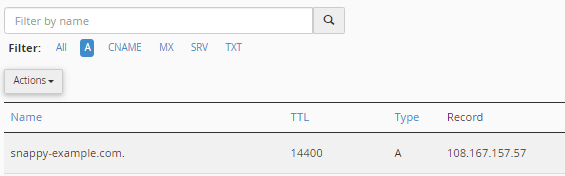
The A record, also known as Address records, is the other side to name servers. It points a domain or subdomain to a specific IP address (IPv4) on a server. This record controls which specific server will host an online presence, such as email, website, and online apps.
For example, the IP address '192.123.45.6' points to the domain name 'example.com' as shown below.
CNAME record
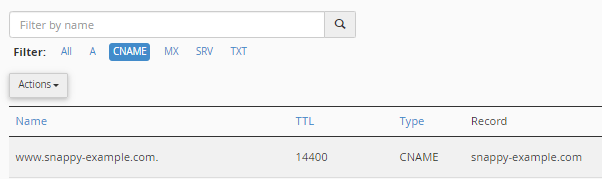
Canonical name records, better known as CNAME records, serve as aliases for domain names of another canonical domain name. This record is used to indicate subdomains that might be listed under or associated with your current domain.
The most common example is when you have both 'example.com' and 'www.example.com.'
MX record
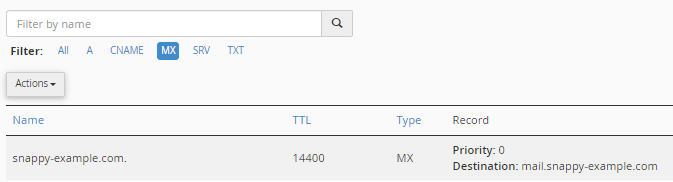
The Mail Exchange record or MX record specifies the mail server responsible for sending and receiving emails on behalf of a domain name. MX records work in conjunction with A and NS records to direct the email received for a domain name to the proper mail server.
MX records vary depending on your email host; some may have multiple MX records, such as Google Workspace, and some may only have one, like %%BRAND%%. Usually, MX records are prioritized with a number of preferences that indicate which mail servers should be used when several are listed.
TXT record
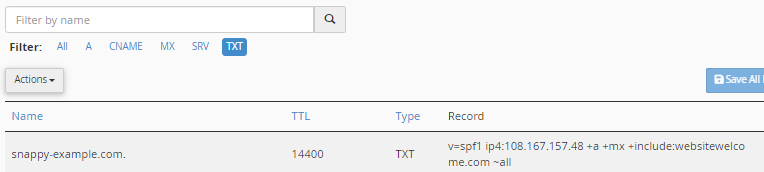
Text or TXT records are custom records containing human- and machine-readable data. These records are used for various purposes, including the prevention of spoofing email attacks and validation of domain ownership, such as Google Workspace.