Professional Email - How to Manage Auto-Renew
To help avoid an interruption in service, you can keep your HostGator Professional Email subscription set to renew automatically. When auto-renew is on, your payment method on file is charged at the renewal rate when your term ends. You can see your renewal price in the Renewal Center.
This article will walk you through how to manage the auto-renew settings for your HostGator Professional Email subscription, and what to do before turning it off.
Before You Turn Off Auto-Renew: Back Up Your Emails
If you decide not to renew, we strongly recommend backing up your mailbox data before your subscription ends. Once the subscription expires, your emails, contacts, and attachments may no longer be available. For the timeframes for your plan, contact us via phone or chat.
Make sure to save a copy of:
- Important emails and attachments
- Your contacts and address book
- Calendar events, if you use them
To save a copy of your contacts, open Contacts in webmail and click Export contacts. For more details, see HostGator Professional Email - How to Import Contacts from a CSV File.
How to Manage Auto-Renew for HostGator Professional Email
- Log in to your Customer Portal.
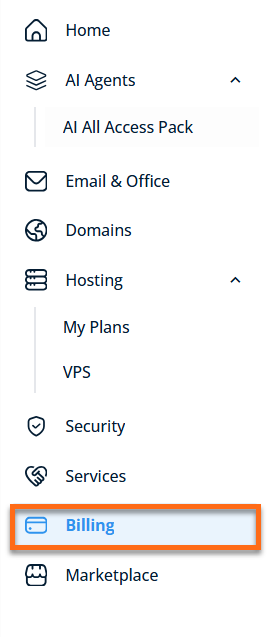
- Go to Billing from the left navigation menu.
- Under the Renewal Center tab, find and select your Professional Email subscription from the list of products.
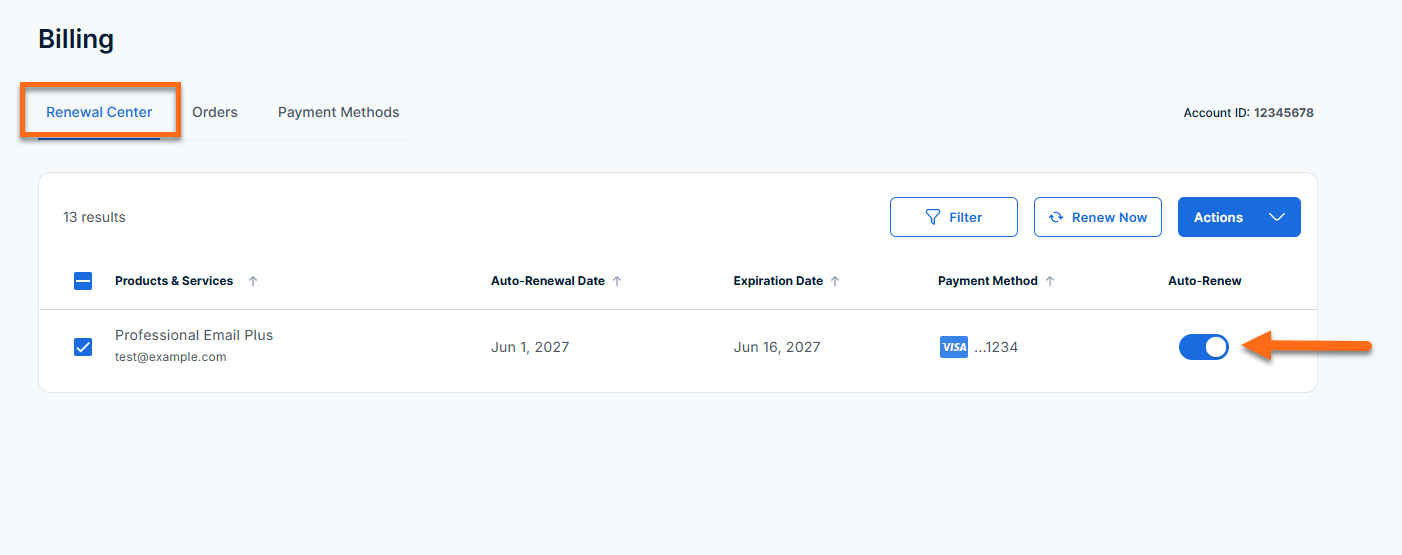
- Use the Auto-Renew toggle to turn auto-renew on or off, depending on your preference. Make sure the toggle shows your new setting. You can check your subscription's renewal date in the Renewal Center.
What Happens if I Don’t Renew Professional Email?
If you turn off auto-renew, your HostGator Professional Email subscription stays active until the end of your current term. When the term ends, or if you otherwise allow the subscription to expire, you'll lose access to your Professional Email mailboxes. That means you won't be able to send or receive messages using those addresses, and any emails, contacts, or settings stored in the mailbox may no longer be available.
If you change your mind, you can purchase HostGator Professional Email again and set up your mailboxes from your HostGator account. Available plans and pricing at that time may differ from your current subscription.