Knowledge Base
Categories: Microsoft 365
Microsoft Customer Agreement (MCA) - Action Required to Avoid Transaction Blocks
Beginning January 21, 2026, customers who have not yet agreed to Microsoft’s updated Customer Agreement (MCA) will lose access to certain features in the Microsoft Partner Center.
To avoid any disruption, please review this article and complete the MCA acceptance process if you haven’t done so already.
Impacted Transactions
If you have not accepted the MCA, the following actions will be blocked:
- New purchases of Microsoft products or services
- Adjusting quantities (increases or decreases) of existing subscriptions
- Changing term durations or billing plans
- Upgrading existing subscriptions
These restrictions will be lifted immediately after you accept the MCA.
Accepting the Microsoft Customer Agreement
Follow the steps below to accept the MCA directly:
- Use the URL below to sign into the Microsoft 365 Admin Center:
https://admin.microsoft.com/AdminPortal/Home?ref=/BillingAccounts/agreement - Sign in using your admin credentials.
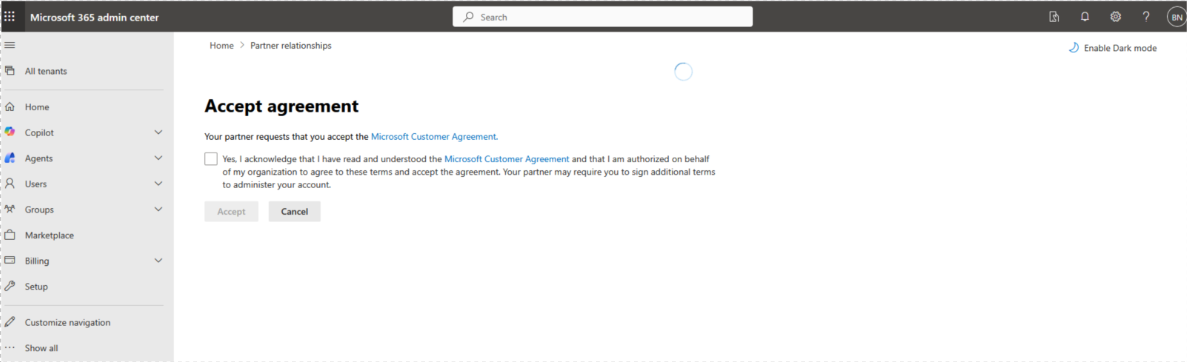
- When prompted, review the Microsoft Customer Agreement.
- Tick the checkbox to accept the agreement.
- (Optional) To view your partner relationships:
- Go to Settings > Partner relationships.
- View a list of partners you work with and select any partner to see detailed information.
- No further action is needed if you have already accepted the MCA.
- Blocks will be automatically lifted once acceptance is confirmed.
Did you find this article helpful?