HostGator Complete Security: How to Assign a Domain
The Complete Security Malware Protection Plan offers powerful website security designed to protect your domain from malware, cyber attacks, and other vulnerabilities. With features like proactive malware scanning, automatic malware removal, and timely security alerts, this security plan helps you keep your website fully safe and secure.
In this guide, you will learn how to easily assign a security plan to a domain within your HostGator account, activating robust protection for your website.
Important Information
- Single Domain Assignment: Each Complete Security Plan applies to one domain only.
- Multiple Domains Security: For securing multiple domains, you need to purchase a separate Complete Security Plan for each one.
- Exclusive Feature: Domain assignment functionality is available exclusively with the Complete Security Malware Protection Plan.
How to Assign Your Domain to the Complete Security Plan
Follow these simple steps to activate the Complete Security Malware Protection Plan for your specific HostGator domain:
- Log in to the Customer Portal.
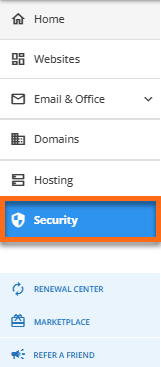
- Click Security on the left-hand menu.
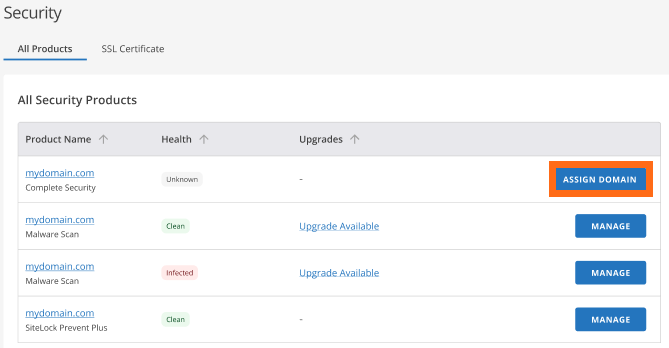
- Locate your Complete Security Malware Protection Plan under the list of security services. Click Assign Domain.
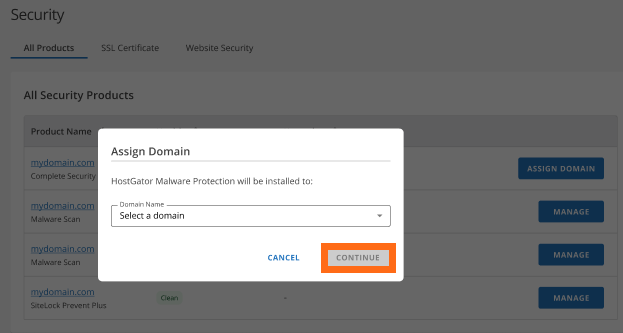
- Select the domain you want to protect from the dropdown menu or available options. Click Continue to confirm your selection and assign the security plan.
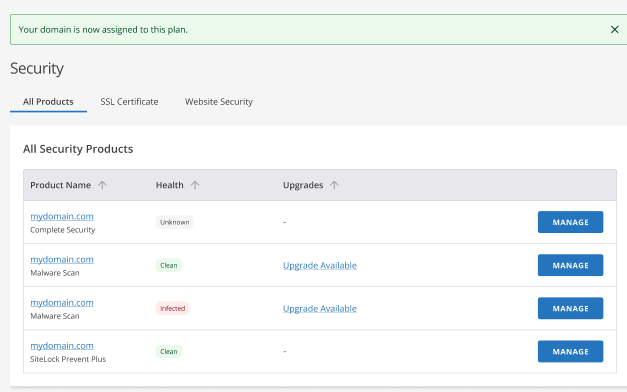
- If the assignment is successful, you will receive a confirmation message indicating your domain is now protected by the security plan.
Note: If the domain assignment fails, an unsuccessful message will appear.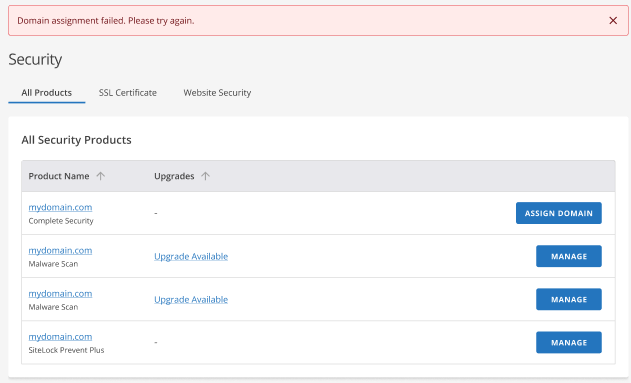
Assigning the Complete Security Malware Protection Plan to your HostGator domain is a quick but important task that will help protect your site from cyber attacks. All you need to do is follow the instructions stated above, and you can rest assured that your selected domain will be protected against malware. Bear in mind that each plan only protects one domain at a time.