Knowledge Base
Categories: Payment
European Union Value Added Tax (VAT)
How to submit tax-exemption documents?
You can provide your VAT number at the time of purchase, or you can add your VAT number to your billing account if you did not provide it at the time of purchase.
Below are the step-by-step instructions for submitting your VAT Number:
These instructions are only applicable for customers submitting their VAT Number for exemption. If you want to submit for federal or state tax-exempt status, please see What's the Difference between federal vs. state tax-exempt status?
- Log in to your Customer Portal.
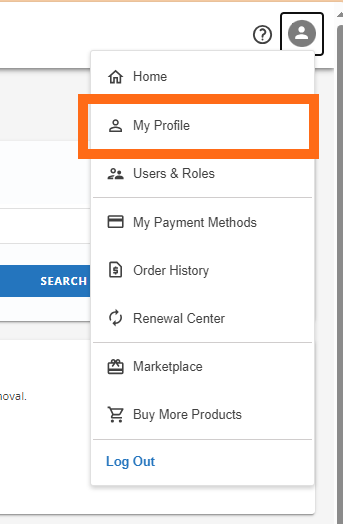
- Click My Profile from the upper right-hand icon.
- Click Edit under Profile.

- Supply your Tax Exemption ID and click SAVE.

Please note that your VAT number is subject to verification, so please ensure that you provide an accurate and valid VAT registration number.
Note: If your account accrued VAT charges BEFORE you supplied the necessary information to HostGator, VAT will be charged on all purchases prior to the change.
Did you find this article helpful?